Here I’ll add a few answers to some problems people contacted me with regarding the model
The chest bones aren’t working properly!
Make sure you have the latest SDK, which means having the latest version of the creator companion! If you have an older SDK or creator companion, things will not work properly!
This issue occurred mostly because VRC Constraints had just come out, and people hadn't updated their SDK.
GogoLoco (V1)
If you’re planning on using GogoLoco, you won’t have enough parameter space to implement it from the get go. You can remove some parameters to make it compatible, or use VRCFury to automatically compress parameters.
If you don't want to use VRCFury to compress parameters, go to TDR_Protonoid>Menus and animator layers>HSV (assuming you’re using the HSV version) and look for ProtoHSV_Parameters. The things taking the most amount of space are the HSV sliders, and I suggest removing those parameters entirely if you’re not using them, especially if you’re trying to add other features to the avatar.
In V2, every Hue slider is removed by default due to the sheer amount of people telling me they did not have enough parameter space for Gogoloco or another addon.
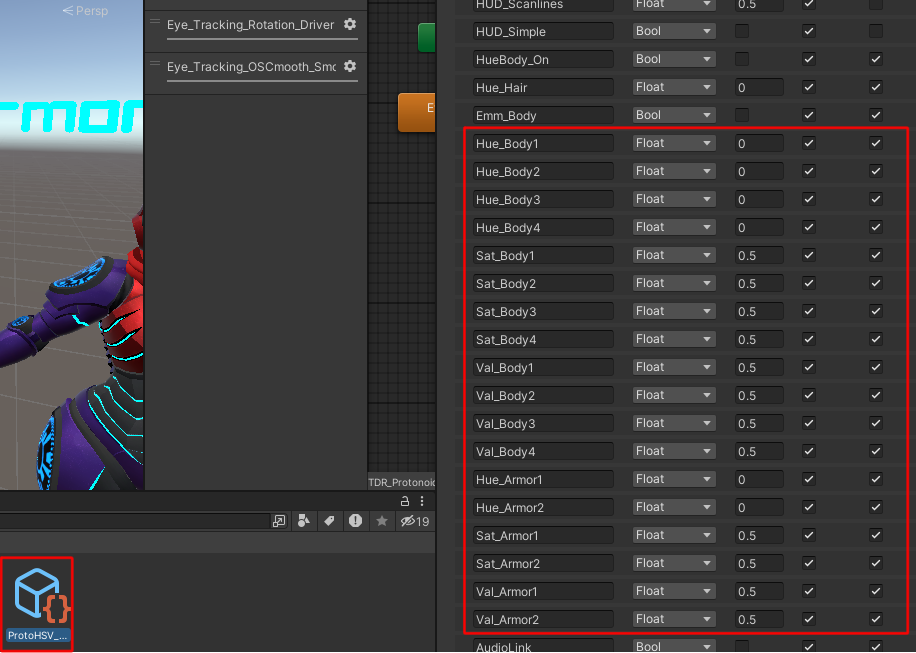
They should all have the prefix “Hue_, Sat_, or Val_”. Unfortunately, the SDK currently makes you click each parameter manually after deleting.
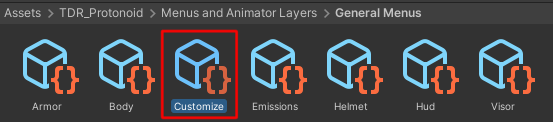
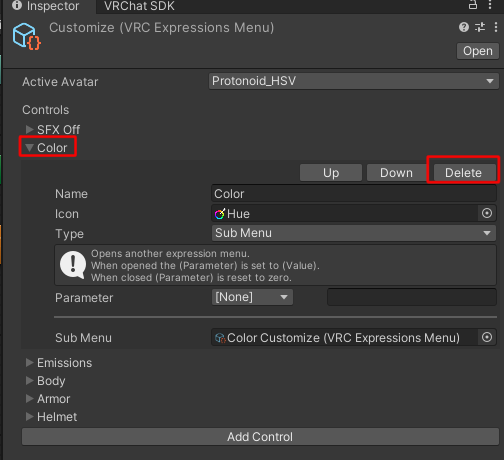
After removing them from the parameter list, you should remove the options from the menus as well, or else the VRC SDK might prevent you from uploading the model. Go to the customize menu in the “General menus” folder, and remove the “color” sub menu. Gogoloco should then be able to be installed on the avatar.
If you still want your Protonoid to be a specific custom color, I highly recommend getting a custom retexture, though it is still possible to keep a specific color without the menus.
In the animator, go to the parameters list and look for the Hue/Sat/Val parameters. If you know the value you use in the sliders, you can convert it from percentage to decimals, from 0 to 1. For example, 80% would be 0.8.
If you don’t mind not having the Hue sliders, I would recommend unchecking the RGBA Color masking section in all the materials for freeing up a bit of VRAM from the avatar.
My avatar has the visor armor shown after replacing the FBX
You might have accidentally merged the armor with the body! Make sure you have an “Armor” and “Body” mesh before exporting.
VRM
I won’t go into a whole tutorial for this, but some things to note: VRM (At the time of this guide being written) won’t accept Poiyomi, which means a lot of functions won’t work on the avatar. If you’re trying to set up a VRM model, none of the UDIM tile discard functions will work, which means you will need to use some of the blendshapes to manually show either the proto face or the organic face. Another thing to note is that the protogen face might be hidden by default, which means you might have to make the “H_ProtoFace” blendshape 0, and you’ll need to enable the emission for the face for it to show up. Do note that backface culling needs to be enabled for the mask to function properly. There’s also a blendshape to hide the organic face, and it needs to be turned on if you want to use the proto face.
I’m not too familiar with this process, but I also heard that the VSF format will allow custom shaders like Poiyomi to work in VSeeFace. I cannot guarantee everything will work with this.
The sword and ball are not moving!
There are a few things that might’ve gone wrong. The sword and the Gyroform rely on constraints to move. If those constraints are inactive or gone, your scene might be screwed. Click the “sword” bone in the armature.
If the constraints are inactive, make sure you’re using the latest VRChat-compatible version of Unity, or else things might not work properly. This project was made for Unity 2022, not 2019. You could reactivate all the inactive constraints, but it’s gonna take some work. Check all the bones that have constraints on them. For reference, every bone with MCH has a constraint on it, but some might also have one without the MCH prefix, like all the sword bones and the Gyroform. There could be others I’ve missed but that’s the gist of it.
If the constraints are entirely gone, you might have exported your model from blender with the armature missing. To fix this, you can reimport the custom package and let it replace the scene.
You might also have forgotten to open the scene. You’re not meant to drag and drop the FBX!
I can’t open the .blend file! There’s just a cube!
You do not have the right Blender version. Older versions of blender often can’t open newer files.
Emissions do not work properly on the body!
You might be using a different version of Poiyomi. The project was made with Poiyomi 8.1.167 (V1) and 9.0.61 (V2).
You might also have messed with emission colors in substance. Please read the 📑 Avatar Documentation/👥 Avatar Bases/🐺 Protonoid/📗 Substance Painter Projects#Emissions
Most of the avatar disappeared!
The materials may have been scrambled. try to reassign them and see if the issue is resolved!
The nulliform isn't working!
The material may need to be updated. When importing the latest version of Poiyomi, the materials themselves may still be using older versions of the script. These older versions may have broken functions until they are updated to the latest version using this button: